
Using colour
Colour range
We offer an extensive range of colours to choose from across our fabrics and decorations. To view and understand our range, see Colour options.
By default, we display the standard colours that are available for the area you are designing. In some cases, '+ More colours' are available. However, please keep in mind that these additional colours may not be available across all areas of your garment.
On garment
We keep track of the colours you’ve already used across your design to make it easier to reuse your preferred colours across your entire design.
Favourites
Registered users have access to Favourites, which gives you the added benefit of being able to access your favourite colours across all products in the Design Lab. This is handy if you need to save your closest-matching brand colours and are still trying out options.
To add a favourite, select the heart icon while viewing/selecting your favourite colour.
Please keep in mind that some colours may not be available in all areas of the garment.
See Unavailable colours for more information.
Finding colours
Upload your logo/graphic
This is the simplest way to find your closest matching colour where strict colour-matching to previously-produced materials or garments is not required. However, we suggest reviewing the warnings below for common issues to be aware of.
Simply upload your logo/graphic to your product design via the Upload feature in the Design Lab to automatically determine your closest colour matches available within a decoration space.
These colours will be visible 'On garment' for use throughout your design.
If you like these colours, we suggest saving them to Favourites for ease of use during the design process.
Warnings:
Colour matching can be subjective and an automated process isn’t foolproof, particularly if your colour falls within the tolerance range of more than one colour. In some cases, you may prefer to go with a slightly different shade of colour than the one that is auto-suggested.
Automatic conversion relies on the colours in your logo/graphic being accurately represented and technically set correctly. This may require advanced design knowledge to review. Additionally, we often see examples where previous garments have not matched your colour accurately and as such, a discrepancy can be created when purchasing new products. For more information about this and your options, see our guide on Colour matching.
Colour search
Use the colour search to find colours by:
Name - e.g. 'Red'.
Keyword - e.g. 'Sunset'.
Hex code - e.g. '#ABC123'.
When using colour search, we will return results for colours that are available in the area you are currently designing. If you are looking to understand colour options more broadly available to you then we suggest starting with the Colour Assistant instead.
Colour Assistant
The Colour Assistant is available to registered users only and allows you to find the closest matching colours across our full colour range using hex codes to add to your favourites. The Colour Assistant is only visible when you are selecting or editing a colour.
If you're looking for accuracy and to be able to select the best colour for your branding needs, we highly suggest using the Colour Assistant.
To use the Colour Assistant:
Open a colour panel in the Design Lab on the product you wish to design.
Determine the hex code colour requirements from your brand/design.
Add up to 5 hex code colours to the assistant.
Check colours.
Review the options available from our full colour range.
We will select the best match and display 2 other options closely matching the hex code colour.
Add the selected colours to your favourites.
Note: With this process, we are finding your closest match from our entire colour range. As such, you may find that the colours selected are only able to be used on sublimated fabrics or in our decoration spaces.
For fabric colour options, which are more limited, we suggest reviewing these directly while colouring the fabrics.
Unavailable colours
When you have used or favourited a colour in the Design Lab, you may notice that the colour is not available on every area of the garment. This is because colour options can be different or restricted between the styles, fabrics, and decoration/design areas.
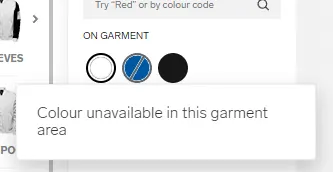
If you are having trouble locating colours that are able to be used across both fabrics and decorations, we suggest sticking to our standard colour range (visible prior to utilising colour search or the '+ More colours').