
Personalise for individuals
Custom names and numbers allow each member of your group to personalise their garment during the ordering process.
Minimum order quantities still apply for the total number of garments needed to submit the order. However, custom names and numbers will allow you to create specific text areas which can be personalised.
Unlike plain text or decorations, the custom name or number can be different for each group member’s order.
Please note: Group members' individual custom names are not added until your order is open.
Adding a custom name or number to your design
Open an existing design or start a new design in the Design Lab.
Select DESIGNS, then select the design space you wish to add the custom name or number to.
Select ADD NAMES AND NUMBERS.
To add a custom name, select ADD NAME.
To add a custom number, select ADD NUMBER.
Your custom name or number will be visible in your chosen decoration space.
If the fabric colour is black, you will need to change the colour of the custom name or number for it to be visible.
Design options
Custom name and number limits
You can have up to 4 custom names and/or numbers on your design in total.
Fonts
There are 3 font options: Oswald Bold, Lobster and Brando.

If your group is likely to need a high character count for their custom name, we recommend you select either Oswald Bold or Lobster, which are able to incorporate additional characters within the Decoration width.
Font sizes
Within the Font menu - where available - you may change the size between Small or Large custom names and numbers.
Small: 1cm height for Uppercase.
Large: 4cm height for Uppercase.
Note: Small decoration spaces only support Small custom names and the Large option will not be available.
Font casing
If your design has a requirement that the custom name uses only uppercase/all caps or sentence casing, then we suggest considering the following:
Update the 'Type of name' to use the intended case. E.g. Instead of 'Nickname' change it to 'NICKNAME'.
We recommend that the Lobster font is only used with sentence/title case
Ensure that you specify in your Group Instructions to use all uppercase or sentence case as required if you are running a group order.
If opting to go with all uppercase for a font, please consider that these larger letters will reduce the number of characters someone can include. This is generally not recommended where surnames/last names are requested as some group members may not be able to input their full name.
Type of name
The 'Type of name' setting allows you to specify the type of name/value that your group should enter when they are placing an order.
You may choose from our default options such as Nickname or First Name, or create your own using the 'Other' option. For example, you may choose to showcase the name of your group members' School House Group, Year Level, or Department, instead of a Nickname or First name.
To see how this is used effectively, please see our Personalisation example below.
Colour
Select from the range of colours available within the decoration space.
Vinyl transfer: 14 colours Including Black, White, Navy, Light Grey, Metallic Silver, Metallic Gold and more.
Sublimation, Embroidery and Heat Transfer Printing: 200+ colours from our extended colour range.
Application
The application type will be automatically selected, with availability being limited depending on the fabric of the garment and the size of the custom name/number.
In some cases you may be able to upgrade from vinyl to embroidery using this tool for more colour options (additional charges apply).
Hover or select the info icon for more information about each application type.
Vinyl transfer
Sublimation
Embroidery
Heat Transfer Printing: This option only applies where a group list has been used in the same decoration location, and all other decorations in the same location will be set to Heat Transfer Printing.
Placement and layout
Custom names and numbers can by placed in most areas within a decoration space. However, they cannot be placed in close proximity to or on top of other designs.
We recommend taking a look at our Guide to layout and placement to understand how your custom name or number should be incorporated into your design.
If your custom name or number is placed in an unsupported location, we will be in touch when your design is reviewed by our team following order submission.
Personalisation example
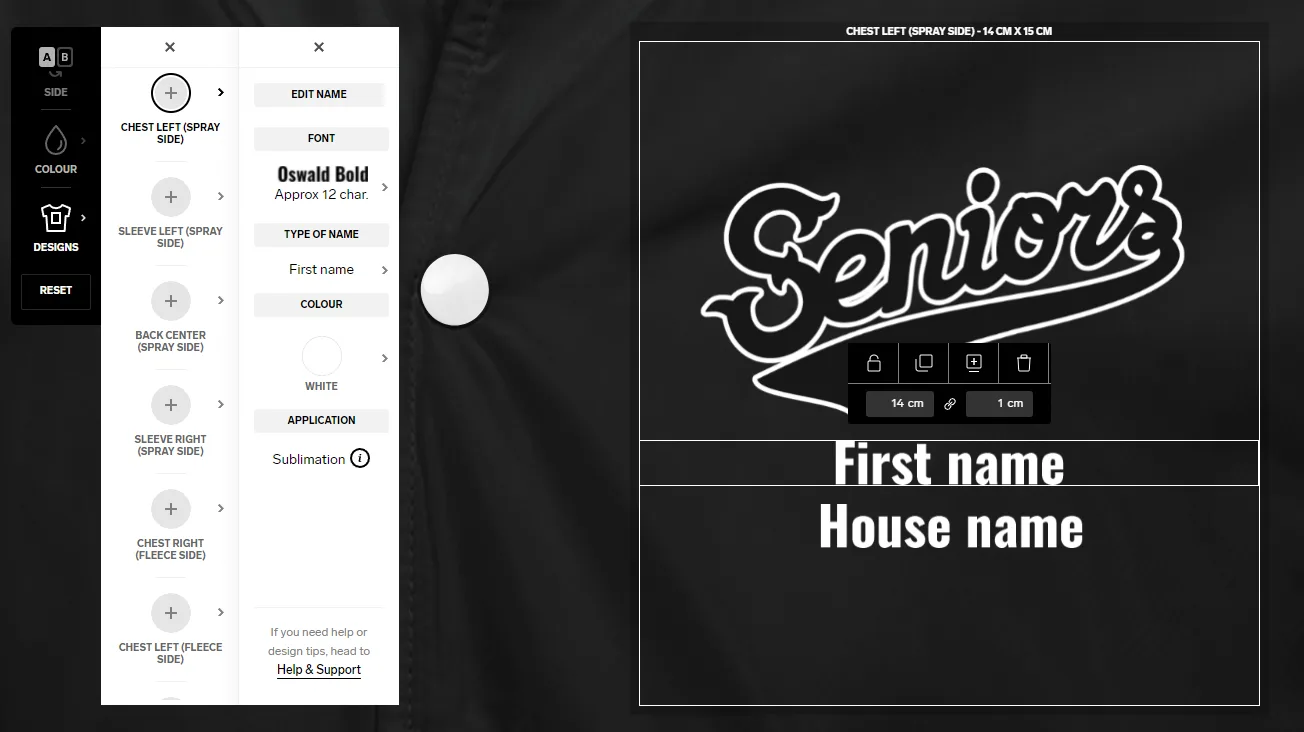
A school wants its group to add a First Name and School House Name to the front of a Jacket.
Design phase
When designing in the Design Lab, two custom names are added and the Type of name field is used to clearly indicate which custom name is which:
First Name
House Name
For consistency, both custom names use the same font and colour.
House Name is specifically added under the First Name so that if anyone need to leave this value blank, then the overall layout is not compromised. It's expected that all individuals will include First Name.
Ordering phase
Once an order has been started then the order manager or the individual group members placing their orders can add their own personalisation values for each name (or leave them blank if not wanted/required).
Within the group ordering page, individuals will see both optional personalisation fields with the label specified for each.
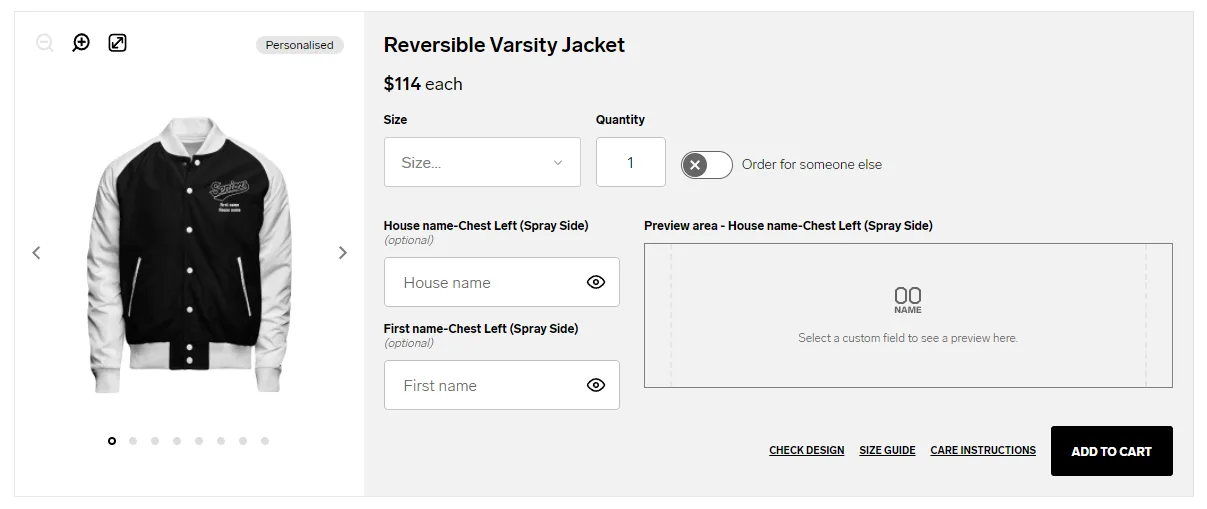
When group members add their personalised value, they can see their personalised name or number in the specified font used in the design and can determine if their name can fit the space available for the decoration location.
